Account Reports
Account reports show the financial result of posted transactions.
Before you start
- Confirm the accounting setup is complete.
- Confirm the date range is correct.
- Confirm the user has access to the report family.
- Confirm posting has already happened for the transactions you want to review.
Visual guide
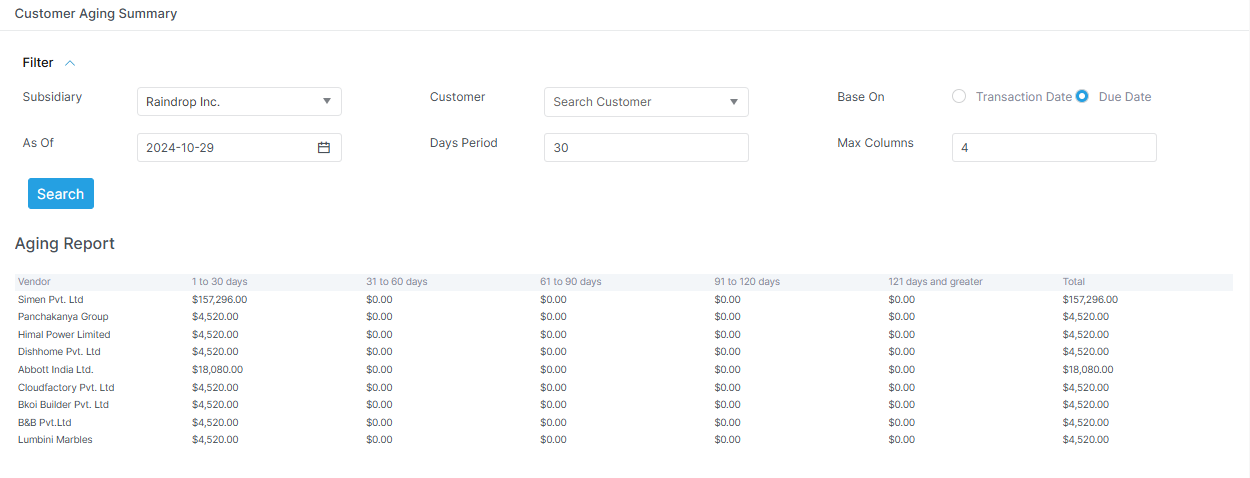
Read ageing reports carefully
These screens show overdue balances by time bucket. They help the team see what is due now and what is overdue.
What to notice in account reports
The date range is the first thing to check. The report family changes the level of detail. Ageing reports are useful when you need overdue balances fast.
Common reports
- trial balance
- customer ledger
- vendor ledger
- bank ledger
- general ledger
- balance sheet
- profit and loss
- cash flow
- budget vs actual
- ageing reports
- employee ledger
What to use them for
- Use ledgers when you need transaction history.
- Use trial balance when you need debit and credit totals.
- Use the balance sheet when you need financial position.
- Use profit and loss when you need performance.
- Use cash flow when you need cash movement.
- Use ageing when you need overdue balances.
- Use budget vs actual when you need plan versus result.
What these reports help with
- reconciliation
- audit review
- period close
- receivable and payable visibility
- management reporting
Real report names in the app
| Report | Purpose |
|---|---|
trial-balance |
Balance of debits and credits |
trial-balance/tree |
Tree style trial balance |
trial-balance/v2 |
Alternate trial balance view |
trial-balance/tree/expanded |
Expanded tree view |
customer-ledger |
Customer transaction history |
vendor-ledger |
Vendor transaction history |
bank-ledger |
Bank transaction history |
general-ledger |
General ledger detail |
balance-sheet |
Financial position |
profit-and-loss |
Profit and loss |
cash-flow |
Cash movement view |
budget-vs-actual |
Budget comparison |
customer-ageing |
Customer ageing |
vendor-ageing |
Vendor ageing |
employee-ledger |
Employee ledger view |
Notes
Some reports have alternate views. For example, trial balance has tree and expanded tree screens. Balance sheet and profit and loss also use parameterized routes in the app.