Payment
The Payment module handles customer and vendor money movement.
Before you start
- Confirm the related invoice or bill exists.
- Confirm the deposit or payment account is correct.
- Confirm the ledger setup is complete.
- Confirm the user can post payments.
Visual guide
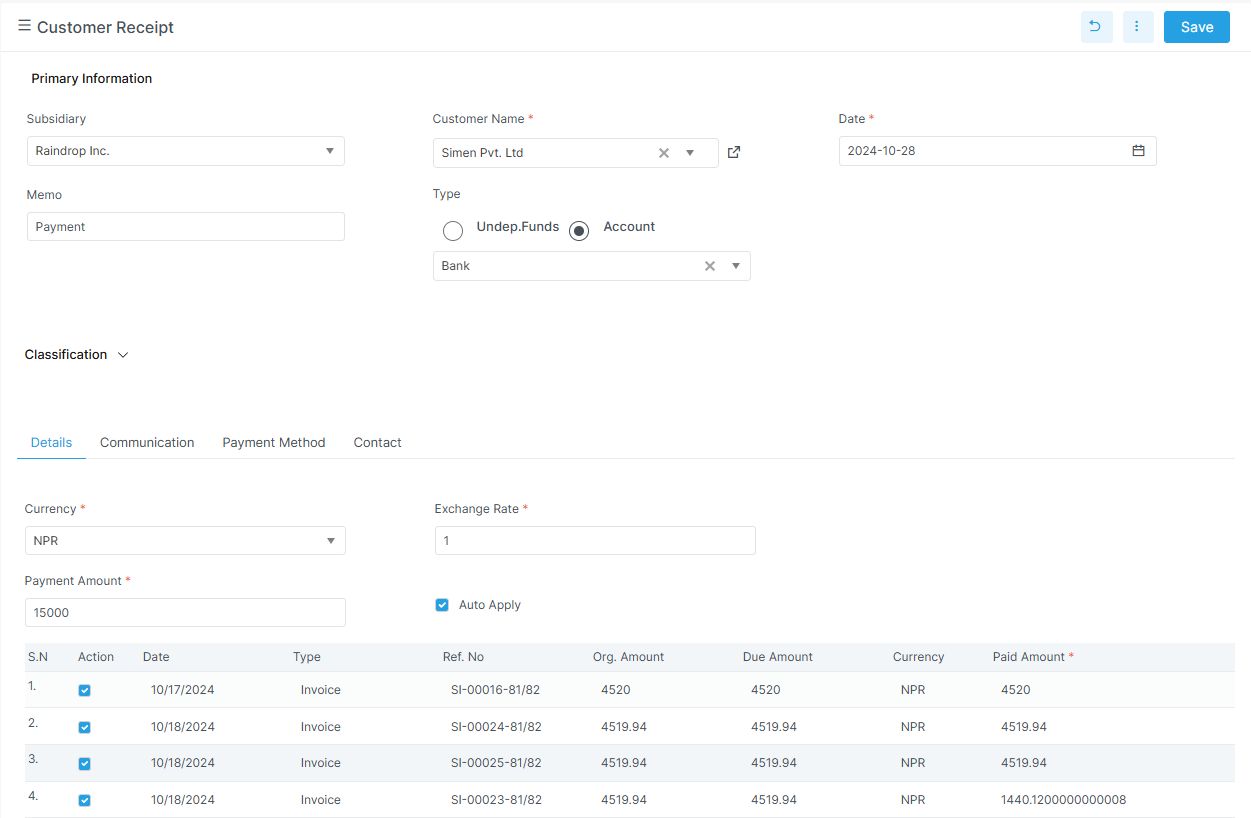
Use receipts for customer money in
Customer receipt is the screen to use when a customer pays an invoice. The grid below shows which invoices get the payment.
What to notice on the receipt screen
The customer, date, and payment type are in the top section. The invoice grid lets the cashier apply money to one or more invoices. Any extra amount can stay unallocated as an advance.
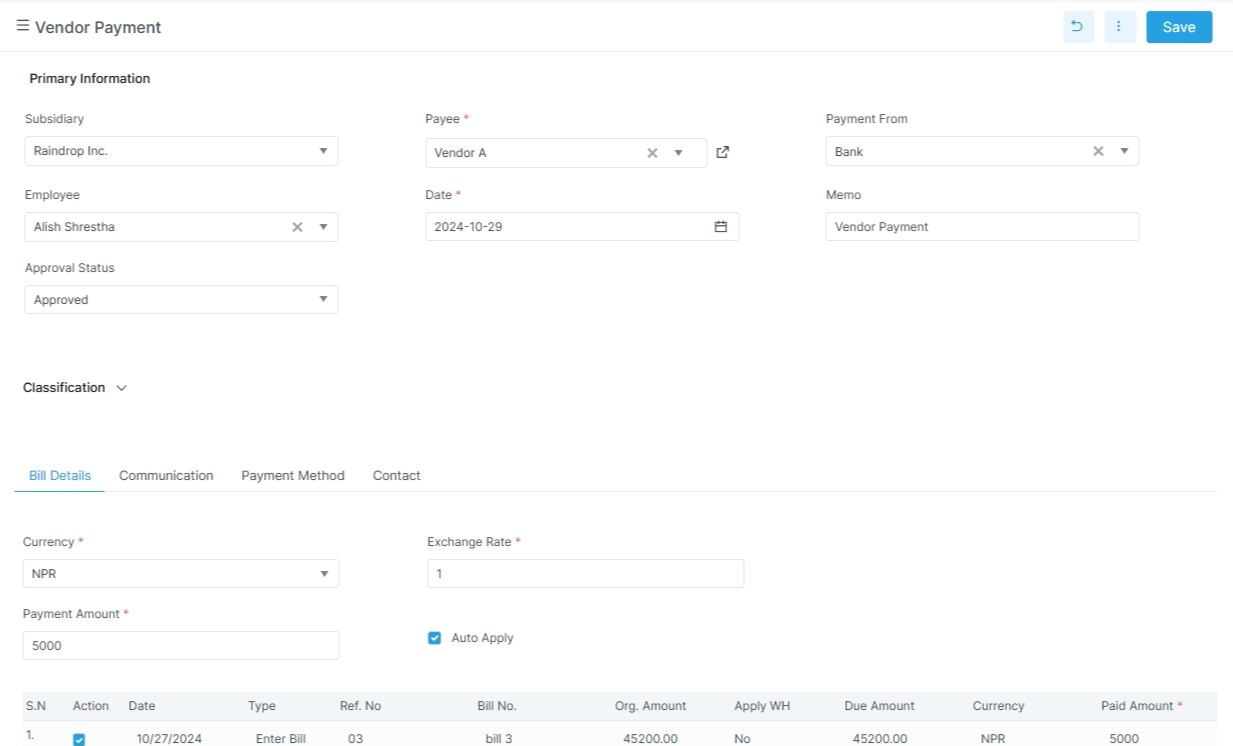
Use vendor payment for money out
Vendor payment records what the business pays to suppliers. Keep the bill allocation and bank details aligned with the payment.
What to notice on the vendor payment screen
The vendor and payment date appear in the header. The bill allocation table shows what is being settled. Bank and cheque details matter when the payment is not cash.
Main routes in the app
| Route | Purpose |
|---|---|
customer-receipt |
Receive payment from a customer |
vendor-payment |
Pay a vendor |
Related pages
Note on refunds
The backend includes a customer refund DTO. The current top-level payment nav shows customer receipt and vendor payment. If a refund screen is exposed later, it should be documented in this portal.
Customer receipt
The customer payment detail DTO includes:
| Field | Meaning |
|---|---|
invoice_no |
Invoice being paid |
remaining_amount |
Remaining invoice amount |
paid_amount |
Amount applied to that invoice |
is_wh_tax_applied |
Withholding tax flag |
wh_tax_code |
Withholding tax code |
wh_tax_rate |
Withholding tax rate |
wh_tax_amount |
Withholding tax amount |
The customer payment flow typically uses:
| Field | Meaning |
|---|---|
customer |
Customer name |
receipt date |
Payment date |
payment mode |
Cash, bank, cheque, transfer, or similar |
deposit to account |
Destination account |
amount received |
Total amount received |
invoice selection |
Invoices being settled |
unallocated amount |
Remaining amount kept as advance |
Vendor payment
The vendor payment DTO includes:
| Field | Meaning |
|---|---|
payment_no |
Payment number |
vendor_name |
Vendor name |
date |
Payment date |
ledger_name |
Linked account |
payment_amount |
Amount paid |
remaining_balance |
Remaining balance |
currency_name / exchange_rate |
Currency handling |
payment_method |
Payment method |
bank_name / cheque_no / cheque_date |
Bank or cheque details |
account |
Account label |
details |
Bill allocations |
Refund DTO
The customer refund DTO includes:
| Field | Meaning |
|---|---|
party_id |
Customer |
date |
Refund date |
payment_amount |
Refund amount |
payment_method |
Payment method |
bank_name / cheque_no / cheque_date |
Optional bank details |
memo |
Notes |
The DTO enforces that the amount is greater than zero. This is a backend model reference, not a current top-level payment route in the app nav.
Detailed pages
Why it matters
Payments update ledger balances and affect outstanding amounts, cash, and bank reconciliation.