Customer Receipt
This page covers the customer receipt flow. Use it when the customer pays an open invoice.
Before you start
- Confirm the invoice exists.
- Confirm the customer account is correct.
- Confirm the deposit account or payment method is ready.
- Confirm withholding tax rules if they apply.
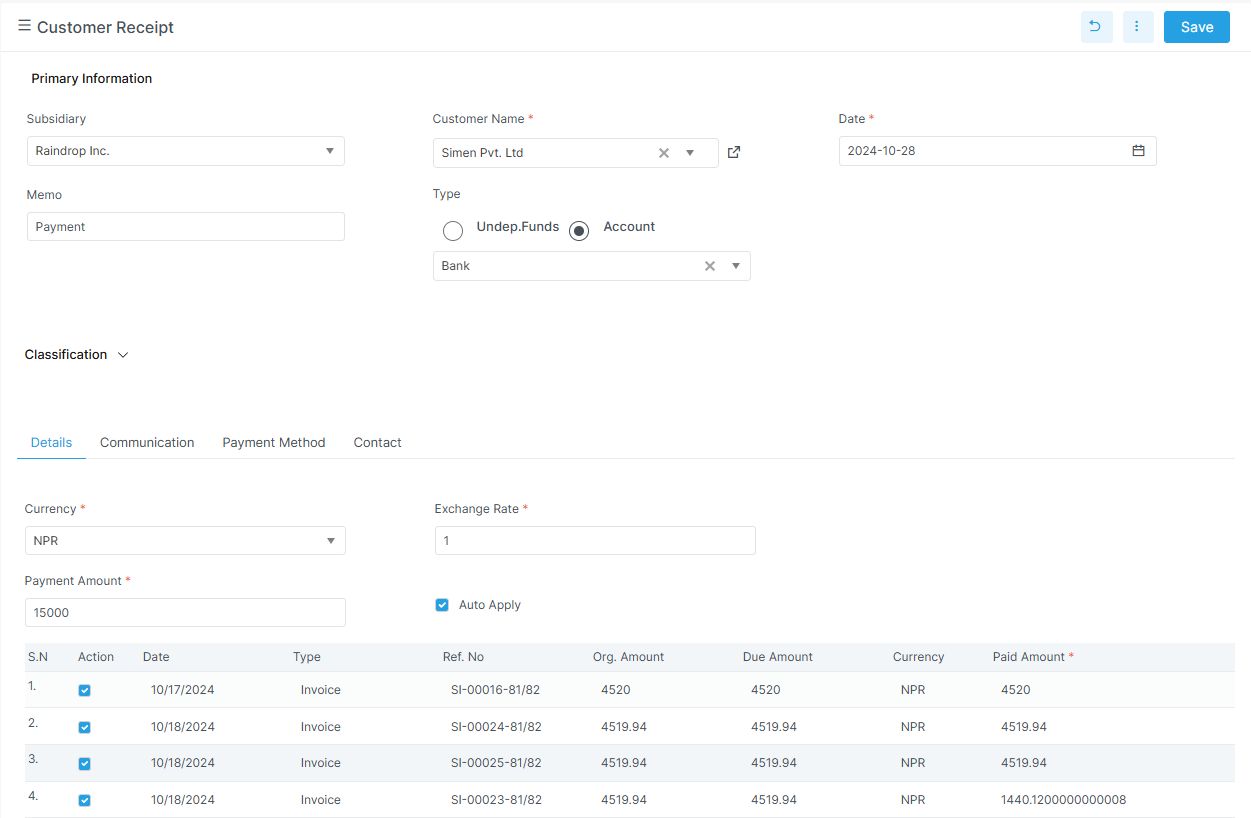
Receipt first, then allocation
Confirm the customer and payment date first. Then allocate the payment to the right invoices.
What the screen tracks
| Field | Meaning |
|---|---|
invoice_no |
Invoice being paid |
remaining_amount |
Remaining invoice amount |
paid_amount |
Amount paid against that invoice |
is_wh_tax_applied |
Withholding tax flag |
wh_tax_code |
Withholding tax code |
wh_tax_rate |
Withholding tax rate |
wh_tax_amount |
Withholding tax amount |
The receipt screen also uses payment mode, deposit account, total amount received, and unallocated amount.
What to notice on the receipt screen
- The customer and payment date are the first fields to verify.
- The invoice grid shows what is being settled.
- Auto apply helps when one payment covers multiple invoices.
- The deposit account tells Bizak where the money goes.
Related pages
Example
A customer pays two invoices at once. The receipt allocates the payment across the invoices. Any extra amount stays unallocated if needed.