Sales
The Sales module supports customer-facing commercial workflows.
Visual guide
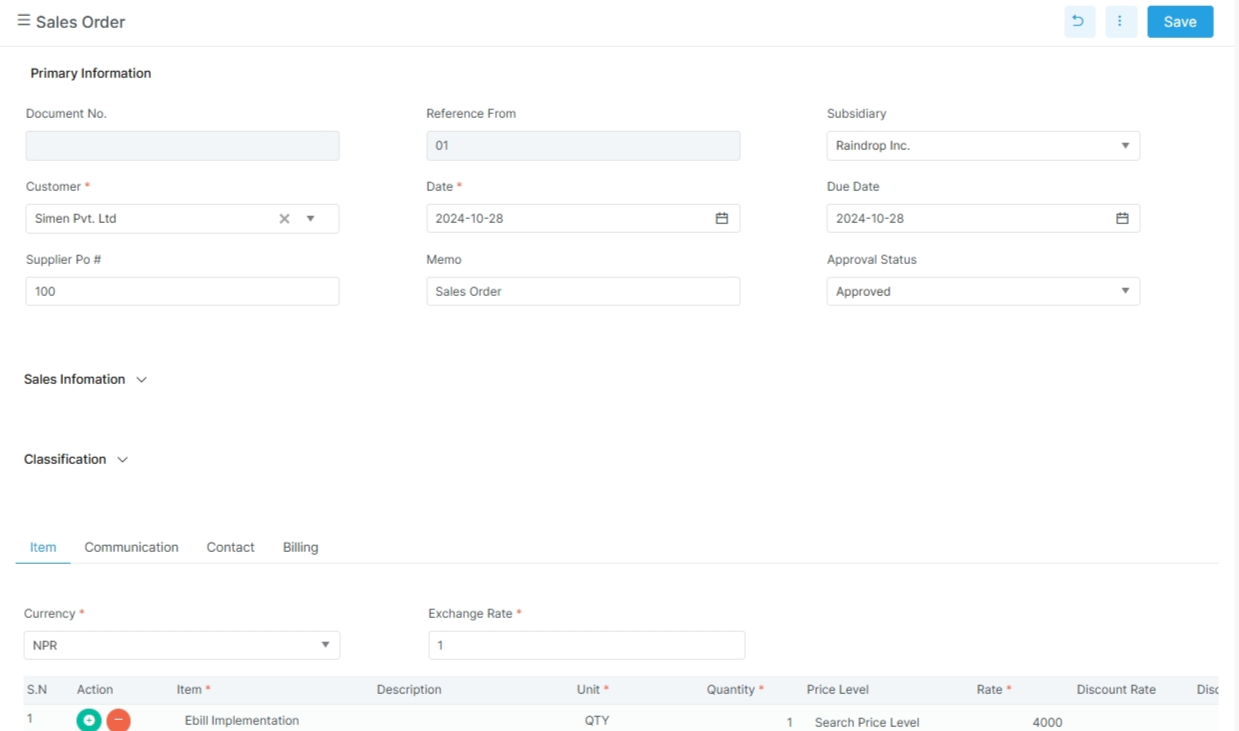
Read the screen from top to bottom
The header holds the customer, dates, and approval fields. The item entry area sits below the header. Save happens from the top right.
What to notice in this screen
The customer and date fields are in the header area. The item lines sit below the tabs. The right side actions stay in the top bar. This is the main order pattern used in the sales flow.
Before you start
- Confirm the customer record exists.
- Confirm items, prices, and units are ready.
- Confirm the sales role can create and post records.
- Confirm taxes, currencies, and ledgers are set up.
Main routes in the app
| Route | Purpose |
|---|---|
opportunity |
Track a new sales lead or opportunity |
estimate |
Prepare a quote or estimate |
order |
Confirm a customer order |
fulfillment |
Mark the order as fulfilled |
invoice |
Create the sales invoice |
return |
Record a customer return |
credit-memo |
Issue a credit memo |
debit-credit-note |
Record a debit or credit note |
Related pages
Opportunity
The opportunity DTO includes:
| Field | Meaning |
|---|---|
opportunity_number |
Opportunity number |
party_name |
Customer or party |
title |
Opportunity title |
date |
Created date |
due_date |
Expected due date |
expected_close_date |
Expected close date |
forecast_type_name |
Forecast category |
opportunity_status_name |
Status text |
sales_stage_name |
Sales stage |
opportunity_type_name |
Opportunity type |
project_name |
Project link |
sales_rep_name |
Sales representative |
probablity |
Probability value |
projected_total |
Expected total |
weighted_total |
Weighted amount |
Each opportunity can also carry details, notes, tasks, events, messages, files, and relationships.
Estimate
The estimate DTO includes:
| Field | Meaning |
|---|---|
estimate_number |
Estimate number |
party |
Customer name |
title |
Estimate title |
date |
Estimate date |
due_date |
Due date |
expected_close_date |
Expected close date |
estimate_status |
Current status |
memo |
Notes |
currency_id / exchange_rate |
Currency handling |
sales_rep_id |
Sales rep |
project_id |
Project |
department_id / location_id |
Segmentation fields |
details |
Line items |
Order
The order DTO includes:
| Field | Meaning |
|---|---|
order_number |
Order number |
party_name |
Customer name |
date |
Order date |
due_date |
Due date |
sales_representative |
Sales rep |
booking_amount |
Booking value |
down_payment_amount |
Down payment |
expected_delivery_date |
Expected delivery |
cancellation_reason |
Reason if cancelled |
supplier_po |
Supplier PO reference |
Invoice
The invoice DTO shows the real posting and billing fields:
| Field | Meaning |
|---|---|
invoice_number |
Invoice number |
party_name |
Customer name |
date |
Invoice date |
due_date |
Due date |
memo |
Notes |
sales_representative |
Sales rep |
payment_mode |
Payment mode |
payment_type |
Credit or other payment type |
ledger_name |
Ledger link |
class_name / department_name / project_name |
Segmentation fields |
currency_name / exchange_rate |
Currency handling |
discount |
Header discount |
bill_discount_type |
Net or gross discount handling |
is_pos |
POS invoice flag |
counter_name |
Counter reference |
bank_name |
Bank name |
cheque_no / cheque_date |
Cheque details |
order_type |
Order type label |
ride_date / car_details |
Extra operational fields used by some flows |
invoice_details |
Line items |
invoice_charge_list |
Extra charges |
The invoice details contain item, unit, quantity, rate, discount, description, tax, and net amount behavior.
Return and credit flows
Bizak also includes:
returncredit-memodebit-credit-note
These are used when a customer needs a return, refund adjustment, or note against an earlier invoice.
Detailed pages
Example sales flow
- Create an opportunity.
- Fill the estimate.
- Confirm the order.
- Fulfill the order.
- Issue the invoice.
- Receive payment.
- Review customer ledger and sales reports.
Practical note
The codebase shows that sales records can also carry notes, files, tasks, events, messages, and relationships. That means sales is not only a billing flow. It is also a customer record flow.